

In this article, you will learn how a source document for course generation from a document should ideally be structured so that text content can be transferred optimally into the course.
Content extracted from a source document
During course creation with the “Stay close to original” option, KAI extracts the text content from the source document. The following content is not taken into account:
- Tables
- Images/graphics
Please note that certain formatting elements are not transferred, such as multi-column layouts, text that is not formatted as headings, and the order of freely positioned text content.
Preparing a file for upload
Before creating a course from an uploaded file (PowerPoint presentation or PDF file), you can structure and format the document accordingly so that KAI can process it as effectively as possible.
The following parameters help KAI process the document optimally:
- The structure of the document is described by a table of contents at the beginning of the document.
- The texts are included in the document as text, not as vectors or images.
- The document is structured into chapters and subchapters. Knowledgeworker Create courses consist of elements on two levels: Learning Objectives (chapters) and Sharable Content Objects (subchapters).
- Headings of chapters and subchapters are clearly formatted as headings, not as body text.
Use the corresponding styles and text formatting options for this purpose, for example a hierarchical arrangement of headings.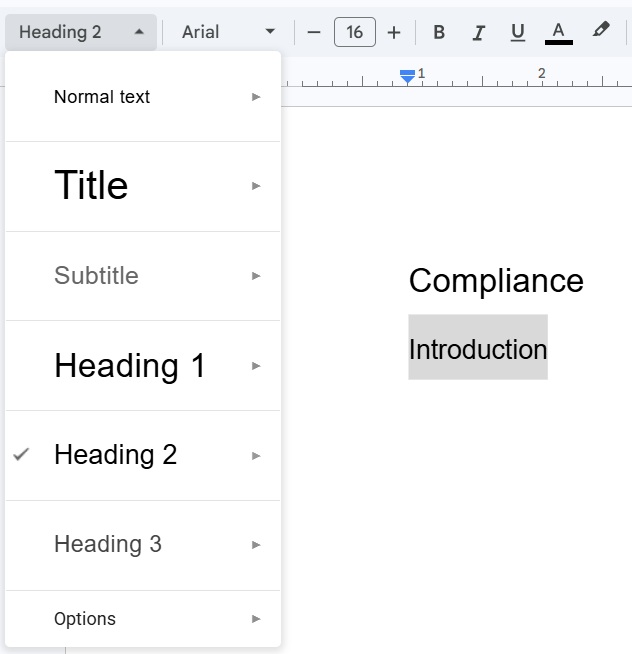
- Body text is formatted in a single column and follows a clear reading order.
- The document contains as few headers and footers as possible.
- The document does not exceed the amount of text that KAI can process during course creation. More information can be found in the article on the supported amount of text for course creation.
Using additional options during course generation
If “Stay close to original” has been selected for file fidelity, this option is also preselected for formality, tone, and course length so that KAI follows the document as closely as possible during course creation. If necessary, you can change these settings—for example, to create a course with the same content but a formal tone from a document written in an informal tone.
Please note when specifying the course length that a large deviation from the document’s scope may cause KAI to expand or shorten content in order to generate the specified learning time.
More information about the options for course generation can be found in the article on course generation with KAI.
Was this article helpful?
That’s Great!
Thank you for your feedback
Sorry! We couldn't be helpful
Thank you for your feedback
Feedback sent
We appreciate your effort and will try to fix the article