

¿Has creado o encontrado un vídeo interesante en YouTube y deseas utilizarlo en un contenido didáctico? Este artículo explica cómo integrarlo.
Integrar el vídeo
- Abre un curso u objeto de conocimiento y arrastra un elemento Medio al contenido.
- Haz clic en el marcador y selecciona Seleccionar un recurso multimedia de la biblioteca y Crear un recurso multimedia.
- Indica el idioma y el nombre del vídeo.
- Selecciona Flujo de vídeo y copia el enlace, por ejemplo https://www.youtube.com/watch?v=Rt3KwP5rQlw, en URL del flujo de vídeo. Define un nombre de archivo.
- Indica altura y anchura; un formato habitual es 1280 × 720.
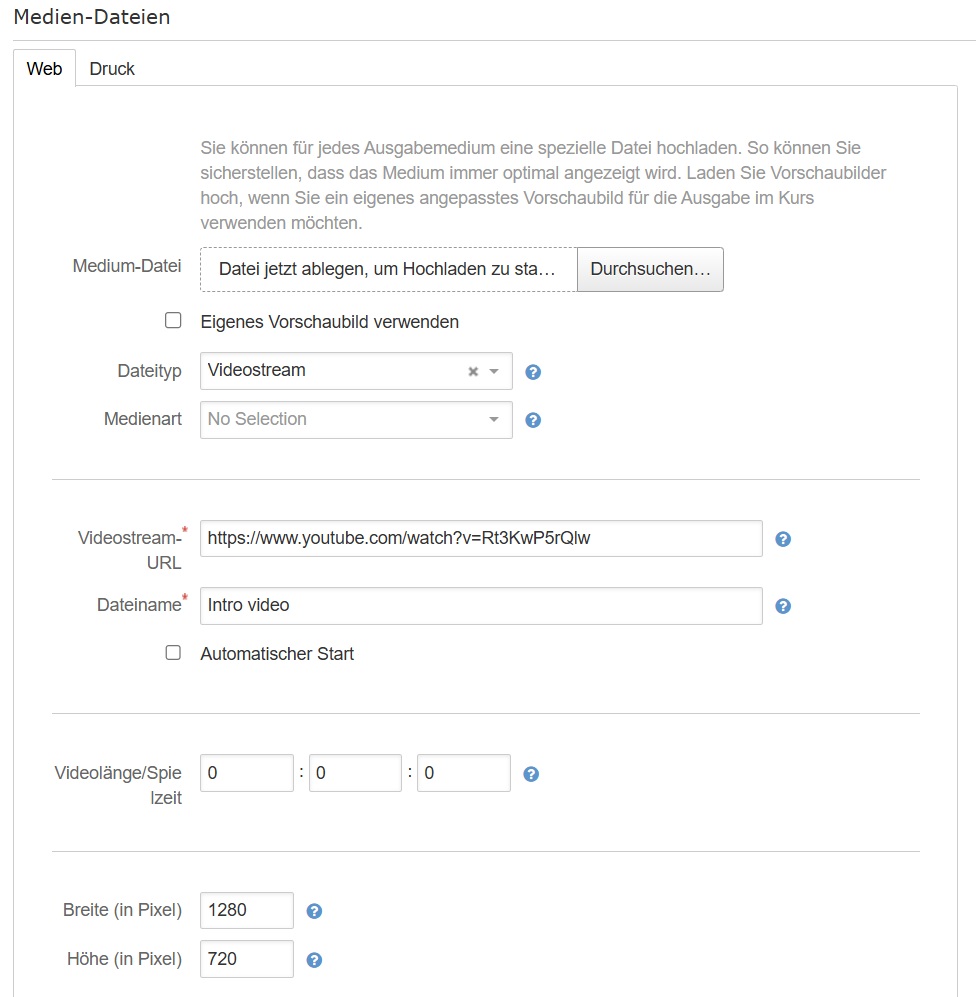
- Selecciona Guardar y cerrar.
Sie haben noch kein Autorentool zur Erstellung von Onlinekursen?
Erfahren Sie, wie Sie mit Knowledgeworker
Create interaktive Lerninhalte erstellen.
Don't have an authoring tool for creating online courses yet?
Learn how to create interactive learning content with Knowledgeworker Create.
Sie haben noch kein Autorentool zur Erstellung von Szenarien?
Erfahren Sie, wie Sie mit Knowledgeworker Coach interaktive Szenarien und Gesprächstrainings erstellen.
Don't have an authoring tool to create scenarios yet?
Learn how to create interactive scenarios and conversation training with Knowledgeworker Coach.
¿Le ha sido útil este artículo?
¡Qué bien!
Gracias por sus comentarios
¡Sentimos mucho no haber sido de ayuda!
Gracias por sus comentarios
Sus comentarios se han enviado
Agradecemos su esfuerzo e intentaremos corregir el artículo