

Knockout questions are questions that must be answered correctly in all cases in order to successfully complete the course. In this article, you will learn how to define specific questions as knockout questions and what you should keep in mind when doing so.
Knockout questions are essential for course completion: if they are not answered correctly, the course is considered failed, regardless of the mastery score defined for it.
Important notes on using knockout questions
- Knockout questions can be defined for questions within questionnaires.
- In combination with a pretest, knockout questions cannot be used.
Defining knockout questions
Proceed as follows:
- Select the questionnaire in the content area.
- In the right-hand panel, open the Questions tab.
- In the list of questions, locate the relevant question or questions and expand additional options using the arrow below the question.
- Activate the knockout question setting.
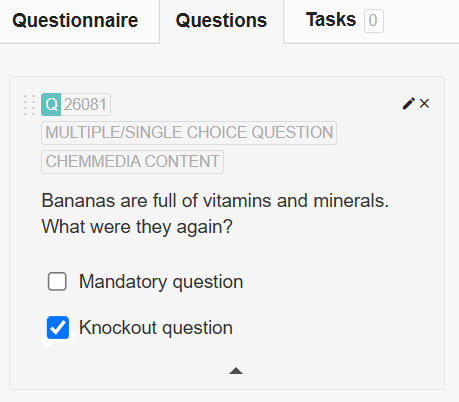
If pooling is enabled for the quiz, combine the mandatory question and knockout question settings to ensure that the question is displayed to all learners in all cases.
You can find more information on configuring questionnaires in Knowledgeworker Create in the article Quiz questions in Knowledgeworker Create.
Was this article helpful?
That’s Great!
Thank you for your feedback
Sorry! We couldn't be helpful
Thank you for your feedback
Feedback sent
We appreciate your effort and will try to fix the article