

In this article, you will learn how to ensure that learners must complete all course content before they are shown the final quiz in the concluding chapter.
Preparing the Course Structure
If you would like the course to conclude with a final quiz, insert the quiz into a separate chapter at the end of the course. You can find out how to make adjustments to the structure of an existing course in the article Adding Learning Objectives and SCOs to existing courses.
Adjusting the Navigation
With the appropriate setting, the course can be configured so that learners must complete all relevant content within a chapter before they can open the next chapter. This ensures that all chapters are completed in sequence, and the final chapter can only be opened after all previous chapters have been completed.
To do this, proceed as follows:
- Open your course and switch to the Sitemap tab on the left-hand side.
- In the sitemap, click on the top level (Course).
- On the right, open the Navigation section and enable the option All relevant content must be seen before navigation to the next page is activated. For more information on marking content as relevant, see the article Relevance settings for your content.
Chapters that have not yet been unlocked are marked with a lock icon and can only be selected once the previous chapters have been completed.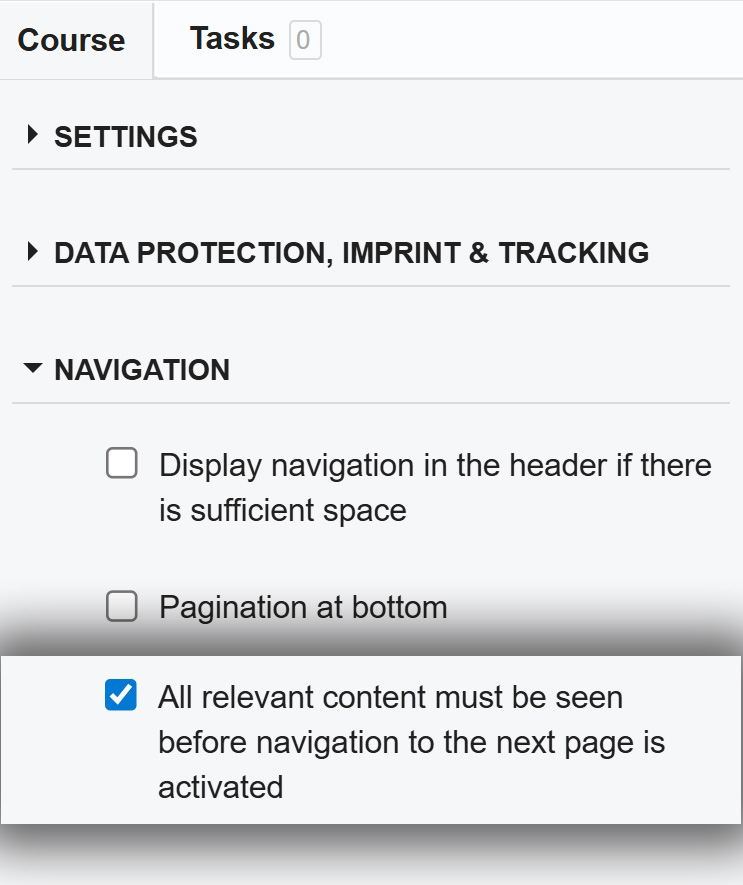
For more information on navigation options, see the article on Restrictive Navigation Options.
Was this article helpful?
That’s Great!
Thank you for your feedback
Sorry! We couldn't be helpful
Thank you for your feedback
Feedback sent
We appreciate your effort and will try to fix the article